

GitHub
XLR8 connects to GitHub through a webhook. Mention an issue identifier such as ACME-42 in a branch name or pull request, and the pull request shows up on the issue. When it is merged, the issue moves to Done. You can read, comment on and merge the pull request without leaving XLR8.
How pull requests are linked
Section titled “How pull requests are linked”GitHub tells XLR8 about every change to a pull request. XLR8 then looks for identifiers of your teams in three places: the branch name, the title and the description.
| Where the identifier appears | Linked | Closes the issue on merge |
|---|---|---|
Branch name, e.g. acme-42-fix-login or jane/acme-42-fix-login |
yes | yes |
Title or description after a closing keyword, e.g. Fixes ACME-42 |
yes | yes |
| Title or description without a closing keyword | yes | no |
Details that matter in practice:
- Closing keywords work as on GitHub:
close,closes,closed,fix,fixes,fixed,resolve,resolves,resolved, in any capitalization and optionally followed by a colon (Closes: ACME-42). One keyword can close a list:Fixes ACME-1, ACME-2 and ACME-3. - Case does not matter.
acme-42andACME-42are the same issue. Only keys of teams that exist in XLR8 count, soUTF-8in a description links nothing unless you have a teamUTF. - Code is ignored. Identifiers inside inline code, code blocks and HTML comments (for example placeholders from a pull request template) do not count.
- Old identifiers work. If an issue moved to another team and got a new identifier, the old one still links to it.
- Links are never removed. Removing the identifier from the pull request later leaves the link in place. A link that once closes keeps closing.
A pull request appears in XLR8 once it is opened, edited, reopened, closed or switched between draft and ready after the webhook is installed. New commits or comments alone do not add it. For a pull request opened before that, editing its title or description is enough.
Status changes
Section titled “Status changes”When a linked pull request is merged, every issue it closes moves to its team’s Done status. Issues that are already done, canceled or a duplicate stay as they are, and so do issues in the trash. Each merge closes issues once: if you reopen an issue afterwards, later events for the same pull request leave it alone.
Opening, closing without merging or marking a pull request as ready for review does not change the issue’s status.
The issue’s history shows each link and each status change with GitHub as the source. You can get a push notification for both events: PR merged is on by default, PR linked is off. Change them in Settings → Notifications.
Name your branch
Section titled “Name your branch”CtrlCommand Shift . copies a branch name for the focused or open issue, for example acme-42-fix-login-on-safari. The same command is in the command menu as Copy branch name and as a button at the top of the issue page.
The name is the identifier in lower case plus the title as a slug: lower case, accents removed, German umlauts written out (ä becomes ae), anything else turned into hyphens, at most 60 characters for the title part. Because the identifier is in the branch name, the pull request closes the issue on merge without any keyword.
If you prefer branches like jane/acme-42-fix-login-on-safari, whoever builds the web app sets VITE_XLR8_BRANCH_PREFIX=jane. It is read when the app is built, so it takes effect with the next deploy.
Pull requests on an issue
Section titled “Pull requests on an issue”An issue with linked pull requests has a Pull requests section. Each row shows the repository and number, the title, the state (Open, Draft, Merged, Closed), a dot for the checks, the review result, the number of comments and a Conflicts badge when the branch cannot be merged cleanly.
Click a row to open the pull request beside the issue. On a narrow window or a phone it opens as its own page. The buttons at the end of the row open it full size (Open full size) or on GitHub (Open on GitHub). Esc closes the pull request beside the issue.
The pull request view
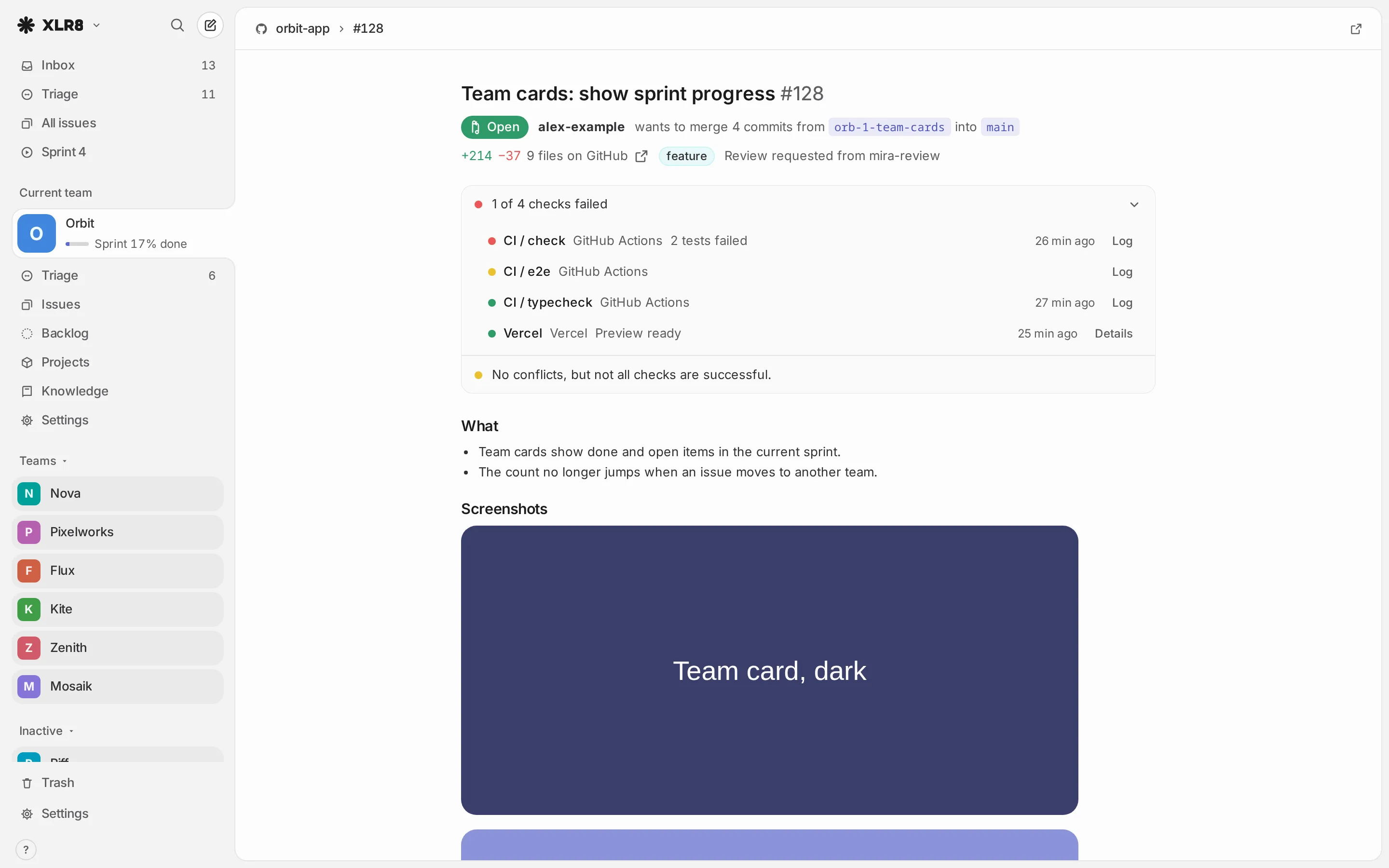
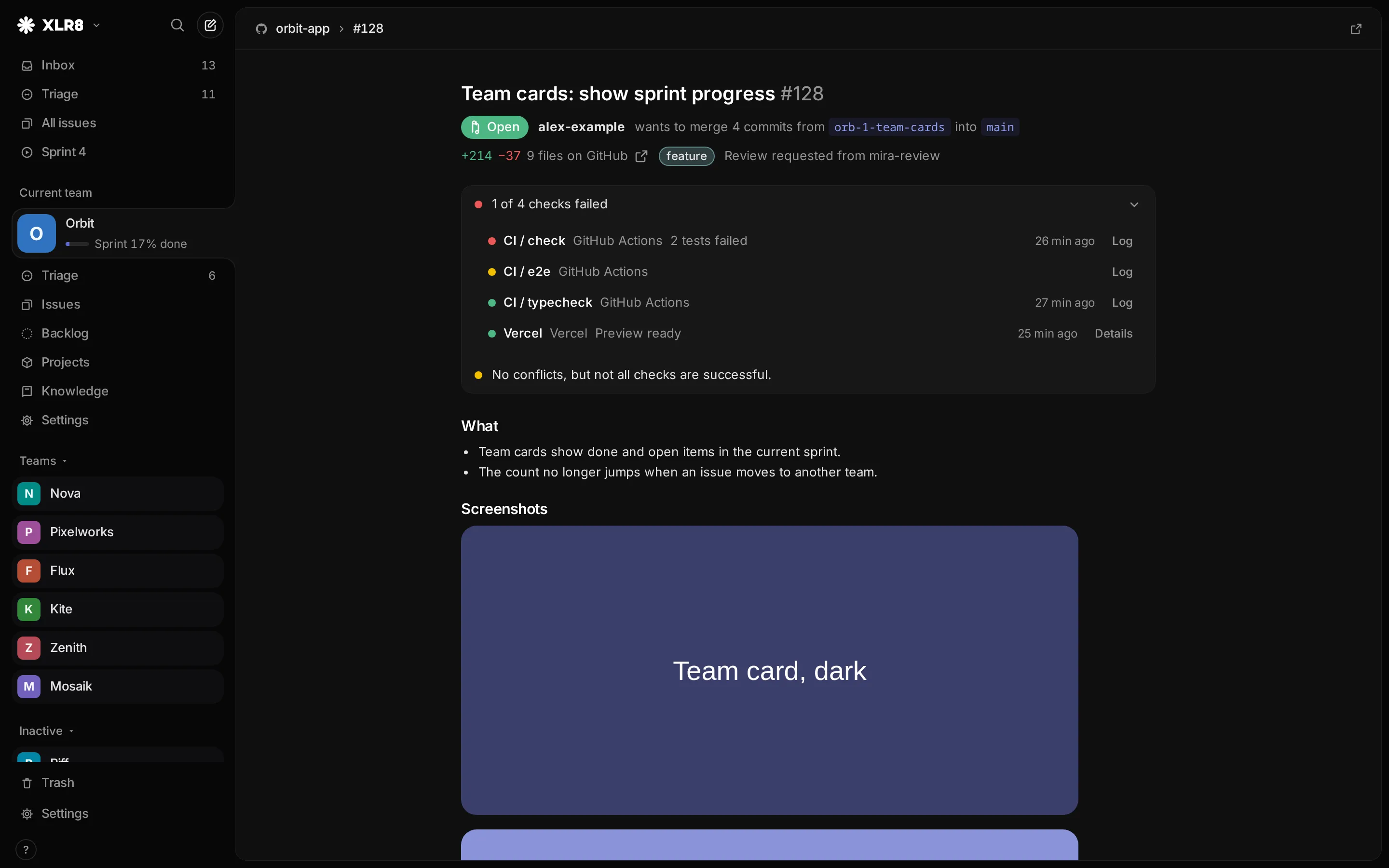
Section titled “The pull request view”The view shows what you need to decide whether a pull request is ready, and lets you act on it.
- Header: title, number, state, author and the sentence “wants to merge 3 commits from
acme-42-fix-loginintomain”. Below that, the size of the change (+120 −45 · 4 files on GitHub), labels and requested reviewers. - Checks: a summary such as “1 of 6 checks failed”. The list opens by itself when a check fails or is still running. Each check links to its log (Log for GitHub Actions, Details for other apps).
- Mergeability: one sentence, for example “No conflicts, ready to merge.” or “Merging is blocked by repository rules (reviews or required checks).”
- Description with images and videos. Click an image to view it large.
- Activity: comments, reviews (“approved”, “requested changes”) and code comments with file and line, in time order. Bots are marked as Bot, and long posts are collapsed behind Show all.
The code diff is not shown in XLR8. The files on GitHub link opens the changed files on GitHub.
Merge, close and comment
Section titled “Merge, close and comment”- Merge: pick the method (Merge commit, Squash and merge or Rebase and merge, as far as the repository allows them), choose whether to Delete branch, click Merge and confirm with Yes, merge. The browser remembers the method you used last. Merging is disabled while the pull request is a draft, has conflicts or is blocked by repository rules; resolve those on GitHub. A merge from XLR8 closes linked issues exactly like a merge on GitHub.
- Close pull request and Reopen do what they say. A merged pull request cannot be changed.
- Comment: write in the box at the bottom and press CtrlCommand Enter or Comment.
Comments, merges and state changes are made through the GitHub token of your XLR8 instance, so on GitHub they appear under the account that owns the token.
How current the data is
Section titled “How current the data is”Every webhook event (new commits, comments, reviews, check results) makes XLR8 fetch a linked pull request again from GitHub a few seconds later, or about 20 seconds later for check results, which arrive in bursts. Opening a pull request also refreshes it when the stored state is older than 30 seconds. Reload from GitHub in the header fetches it right away, and the footer says when it was last fetched.
Without a GitHub token on the server, XLR8 only knows the title and state from the webhook and says so in the view.
Set up GitHub on your instance
Section titled “Set up GitHub on your instance”This part is for whoever runs the XLR8 instance. You need a webhook secret, a GitHub token and the webhook in each repository. All values are backend environment variables; set them in the Convex dashboard (Settings → Environment Variables) or with node tooling/cloud.mjs env set NAME value. See Self-hosting for the general setup.
| Variable | Purpose |
|---|---|
GITHUB_WEBHOOK_SECRET |
Verifies that webhook deliveries come from GitHub. Without it, every delivery is rejected. |
GITHUB_TOKEN |
Fine-grained personal access token. Fetches description, checks, comments and reviews, merges and comments, and manages webhooks. Without it, XLR8 shows only title and state. |
GITHUB_MANAGE_WEBHOOKS |
1 lets XLR8 create missing webhooks and fix their event list. Unset: XLR8 only checks and reports. |
GITHUB_REPOS |
Optional. Limit webhook management to some repositories: owner/name or owner/*, comma-separated. Unset: all repositories the token’s account owns. |
GITHUB_WEBHOOK_SECRET_PREVIOUS |
Only while rotating the secret (see below). |
-
Create the webhook secret. Generate a long random value, for example with
openssl rand -hex 32, store it in your password manager and set it asGITHUB_WEBHOOK_SECRET. -
Create a fine-grained personal access token on GitHub for the repositories whose pull requests XLR8 should show, with these repository permissions:
- Pull requests: read and write
- Contents: read and write
- Issues: read and write
- Webhooks: read and write
- Commit statuses: read
- Actions: read
- Metadata: read
Fine-grained tokens have no permission for checks; check results from other apps arrive through the webhook instead. Set the token as
GITHUB_TOKENwithout typing it on the command line, for examplenode tooling/cloud.mjs env set GITHUB_TOKEN < ~/.config/xlr8/github-token. -
Install the webhook. Either let XLR8 do it: set
GITHUB_MANAGE_WEBHOOKS=1, open Settings → GitHub and click Check now. Or add it by hand (next section). -
Check the result. Settings → GitHub shows the connected account and each repository with its webhook state (Webhook active, Webhook missing, Webhook outdated, Error). Settings → Ops shows the last delivery from GitHub.
XLR8 checks all repositories again every day at 03:30 UTC. With GITHUB_MANAGE_WEBHOOKS=1 and GITHUB_WEBHOOK_SECRET set, it also installs the webhook in new ones. It only covers repositories owned by the token’s account, skips archived ones, and never creates webhooks from a local development backend. Repositories that belong to an organization need the webhook by hand.
GitHub tokens expire after at most a year, and GitHub emails you before that. Create a new one with the same permissions and replace GITHUB_TOKEN.
Add the webhook by hand
Section titled “Add the webhook by hand”In the repository on GitHub, open Settings → Webhooks → Add webhook:
- Payload URL:
https://happy-otter-123.convex.site/github(your Convex deployment), or your custom MCP address if you set one, such ashttps://mcp.xlr8.example.com/github - Content type:
application/json - Secret: the value of
GITHUB_WEBHOOK_SECRET(the same for all repositories) - Events: “Let me select individual events”, then Pull requests, Issue comments, Pull request reviews, Pull request review comments, Pull request review threads, Check runs, Check suites, Statuses and Workflow runs
Save it. GitHub sends a test event right away; under Recent Deliveries it should show response 200. A 401 means the secret does not match.
Rotate the webhook secret
Section titled “Rotate the webhook secret”You can switch to a new secret without losing deliveries:
- Create a new secret.
- Copy the current value to
GITHUB_WEBHOOK_SECRET_PREVIOUSand set the new one asGITHUB_WEBHOOK_SECRET. Both are accepted now. - Enter the new secret in every repository’s webhook settings. The daily check does not do this for you: it only fixes events of existing webhooks, and only webhooks it creates get the current secret.
- When all repositories use the new secret, delete
GITHUB_WEBHOOK_SECRET_PREVIOUS.