

Agents in XLR8
XLR8 is built for one developer working alongside AI agents. You and your agents share one tracker: agents find and read issues, file new ones, report progress and close what they finished, while you keep the final say. They connect through XLR8’s built-in MCP server.
The MCP server
Section titled “The MCP server”Every XLR8 backend runs an MCP server (Model Context Protocol) at /mcp on its HTTP address, for example
https://happy-otter-123.convex.site/mcp. Any MCP client that speaks Streamable HTTP can connect:
- Coding agents such as Claude Code, Codex or Cursor connect with a key you create in the app.
- Claude (claude.ai, desktop and mobile) and ChatGPT connect as a custom connector and sign in through your XLR8 login (OAuth).
To XLR8, a connector is just another agent. Each key and each connector shows up as its own entry under Settings → Agents, with its own name, call count and revoke button. How to set them up: Connect an agent.
Agents use the same operations as the app. A status change by an agent follows the same workflow rules and is recorded in the history just like one you make yourself.
What agents can do
Section titled “What agents can do”- Find and read issues: full-text search, filtered lists (assigned, due, overdue, in progress, done today, triage, current sprint, by team, status, label or project) and the full issue with description, comments, relations, sub-issues, linked pull requests and recent history.
- Create issues: 1 to 50 at once, with description, status, priority, labels, project, estimate, due date and parent issue.
- Change issues: title, description, status, priority, labels, project, estimate, due date and parent.
- Set the status of up to 50 issues at once.
- Move issues to another team. They get a new identifier, and the old one keeps working.
- Comment on issues in Markdown.
- Read the current sprint with its goal, dates, points and issues.
- Read and write knowledge pages: search, list and read pages; create pages and update them, either by replacing the text or by appending to it.
- Look up teams, projects, labels and workflow statuses, so they use valid names.
The full list with parameters is in the MCP tools reference.
Two safeguards protect writes:
requestIdmakes retries safe. Agents pass their own key with a call. If the response gets lost and the agent sends the same call again, XLR8 returns the original result instead of acting twice. Creating issues, commenting and writing knowledge pages require it.expectedvalues prevent overwriting your changes. When an agent changes an issue, it can pass the values it last saw. If you changed a field in the meantime, XLR8 leaves that field alone and reports a conflict, so the agent reads the issue again and decides. Replacing a description or a knowledge page’s text always requires the version the agent based its edit on.
What agents cannot do
Section titled “What agents cannot do”There are no tools for the following, so agents cannot do them over MCP:
- Delete issues, move them to the trash or restore them.
- Delete knowledge pages. When an agent replaces a page’s text, XLR8 first keeps the old text as a version you can restore.
- Edit or delete comments, including their own.
- Change settings: teams, workflows and statuses, labels, projects, appearance, notifications, keys or connectors.
- Create labels or projects. Agents can only use the ones that exist (topics of knowledge pages are the exception: unknown topics are created).
- Plan sprints or add issues to a sprint.
- Add relations between issues (blocks, related, duplicate) or upload files and images.
- Remove issues from your inbox or mark them as read.
Agents never see secrets: keys are stored only as hashes, and no tool returns settings, keys or environment variables.
Each agent may make up to 120 calls per minute and 5,000 per day. Above that, the call fails with a
rate_limited error; for the per-minute limit it says how long to wait. Failed calls count too.
Agent issues land in triage and your inbox
Section titled “Agent issues land in triage and your inbox”When an agent creates an issue without naming a status, the issue goes to the team’s triage status (or the team’s default status if the team has no triage). An agent can choose another starting status, but only within the team’s workflow rules.
Every issue an agent creates also lands in your Inbox, whatever its status, and stays there until you
remove it. That is how XLR8 marks agent work as “not yet reviewed”. Agents see the same mark: get_issue
tells them whether you have read or dismissed the issue yet.
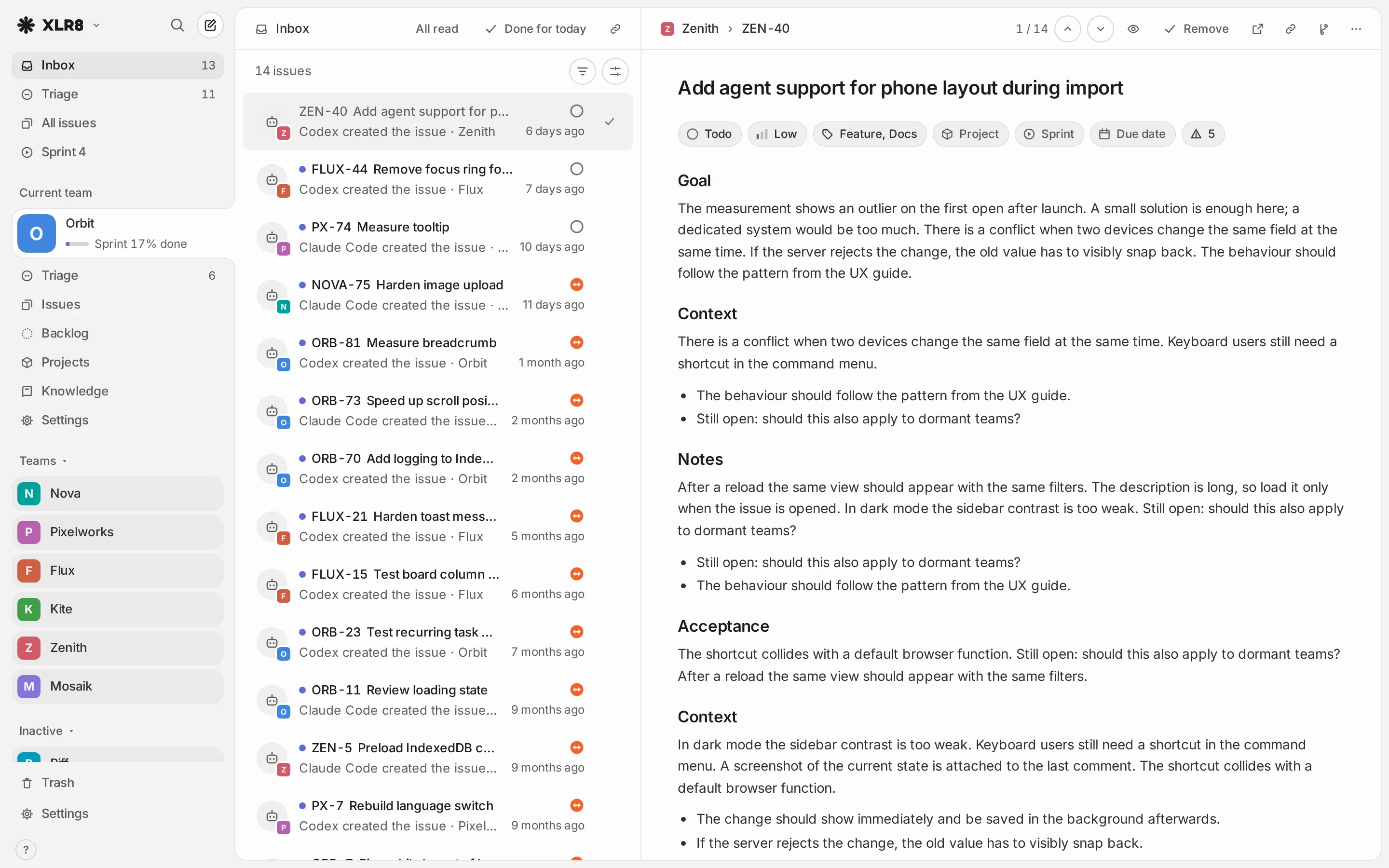
From the inbox you open each issue, decide, and remove the entry (Triage and inbox). Issues you create yourself normally skip the inbox. If you use push notifications, XLR8 by default notifies you when an agent creates an issue or comments; you can turn these events off under Settings → Notifications.
Agent actions in the history
Section titled “Agent actions in the history”Every change an agent makes is recorded with the agent as its author. In an issue’s activity, the agent’s
name (the one you gave the key or the connector) appears with an agent icon next to each change and
comment. When an agent reads the history over MCP, the author shows as <name> (agent), so agents can
tell their own changes and other agents’ changes apart from yours.